
Settings
The gear icon at the bottom of the left rail. These apply to your whole pack, not to one piece.
Pack identity
What players see when your server offers them the resource pack.
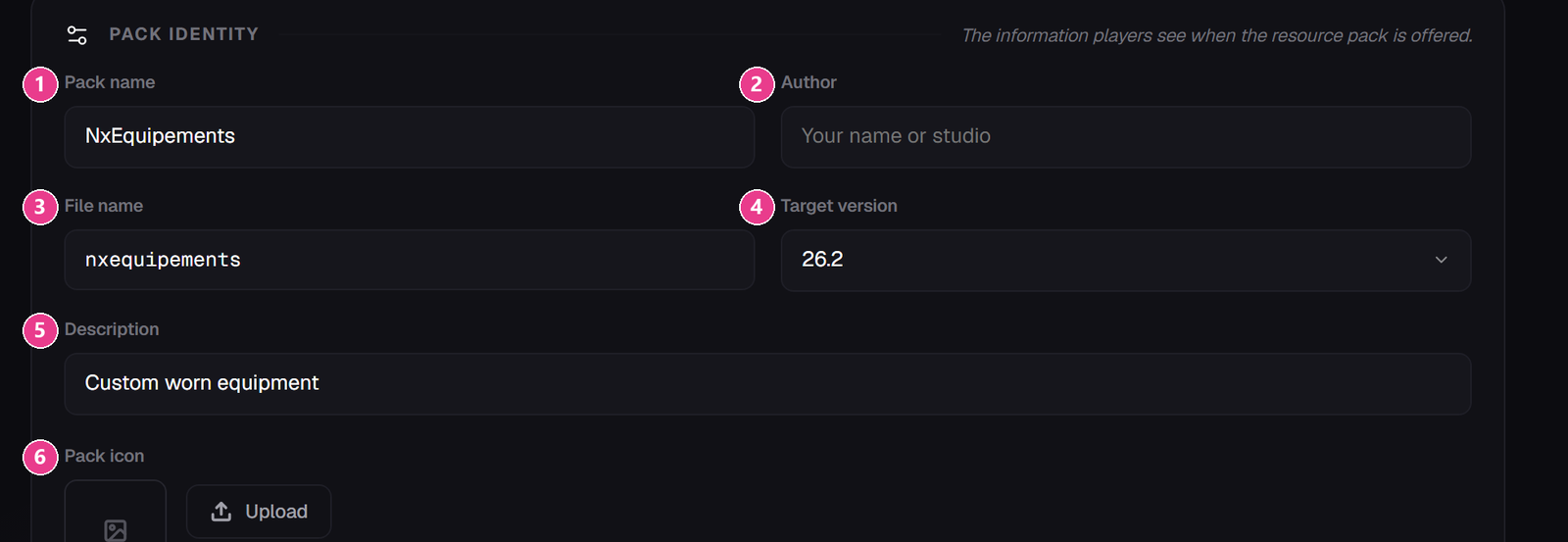
- Pack name — your server or pack name.
- Author — you or your studio.
- File name — the name of the zip you download. Lowercase, no spaces.
- Target version — the newest Minecraft your server runs, from
1.21.4to26.2. - Description — one line, shown in the client's resource pack list.
- Pack icon — square PNG, 16×16 to 512×512. The thumbnail next to the pack name.
Target version doesn't limit who can use your pack. The pack always works from 1.21.4 to 26.2. This setting only tells the editor which Minecraft's item and sound lists to offer you.
Plugin configuration

- Hide slot highlight — hides the white glow vanilla draws on armour slots. On by default, and usually looks better.
- Pack confirmation (seconds) — how long the “click to apply the resource pack” prompt stays clickable in chat. Between 5 and 120; 30 is fine.
Set details are somewhere else
Author, version, website, description and artwork for an individual set live on that set's own screen under Edit details. The Set logo you upload there is also the icon used for that set in the in-game menu.