
HIERARCHY: your boxes
The left panel is the whole model written out as a list. Every box you add appears here, and clicking a row selects that box in the 3D view.
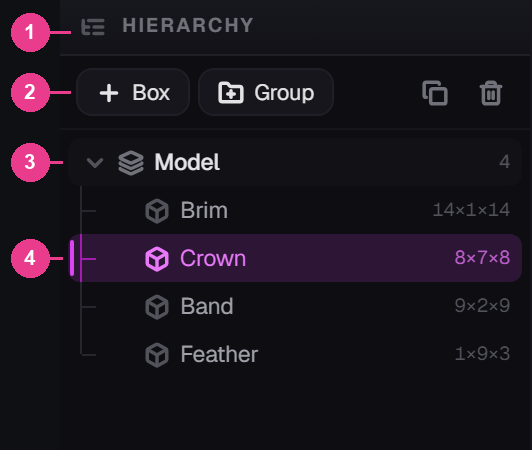
- The panel heading. Click it to fold the panel away, like every other panel in the editor.
- The button bar — add, duplicate and delete.
- Model — the root. Everything lives under it, and the number on the right is how many things sit directly inside.
- A selected box — pink name, pink bar down the left edge. Only one box is ever selected.
The button bar
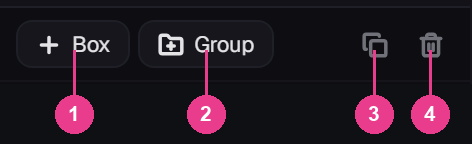
- Box — N. Drops a new box into the model and selects it.
- Group — makes an empty group. Drag boxes onto it to tidy them away.
- Duplicate — Ctrl+D. Copies the selected box, name and all.
- Delete — Del. Removes the selected box.
The last two only work on a selection. With nothing selected their tooltip reads “Pick a box first” and they stay dim.
You cannot delete the last box. Try it and the tooltip changes to “A model needs at least one box”. Delete the ones you don't want and reshape the survivor instead.
What a row tells you
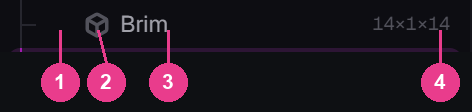
- The indent line — how deep the box sits. Boxes at the top level line up under Model.
- The box icon. Groups get a stacked icon instead.
- The name. Rename it in the INSPECTOR.
- The size — width × height × depth, in units. A quick read on how chunky the box is.
Hover a row
Point at a row and the size is replaced by three buttons.
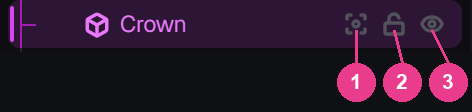
- Show only this box. Everything else disappears so you can get at it. Click again to bring the rest back.
- Lock. The box stays on screen but clicks pass straight through it. Perfect for a big shell you keep grabbing by mistake.
- Hide. Takes it off the screen. The export is unaffected — hidden boxes still ship.
Hide and lock are for your eyes only. Neither changes what players get. If you want a box gone, delete it.
Groups
Click Group and an empty group appears at the bottom of the list. Drag box rows onto it to move them inside.
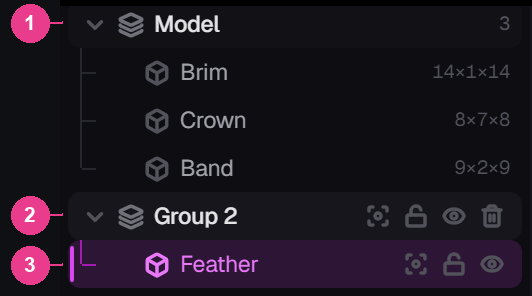
- Model — the count now reads three, because the group took one box out of the top level.
- The group — click the arrow to fold it shut and get the space back.
- Inside the group — indented one step further.
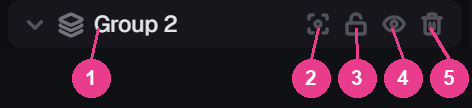
- The group icon — stacked plates, not a box.
- Show only this group.
- Lock the group.
- Hide the group.
- Delete the group. The boxes inside it move up a level — they are not deleted.
Groups are pure tidiness. They don't change the shape, they don't change the export, and a model with fifty boxes in six groups builds exactly like a model with fifty loose boxes.