
🧩 Action Blocks: Core Actions
Core Actions are the foundation of your menu interactivity. They handle giving items, sending messages, and manipulating the user's interface.
- Give Item: Gives the player an item directly into their inventory. You can visually input the Material, Amount, Name, and Lore.
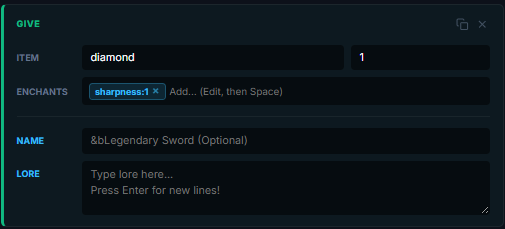
Tip: To add enchantments, type the enchant and level (e.g.,sharpness:5) into the Enchants box and press Space to lock it in. The Material field supports the same formats as a slot's Material (vanilla, PAPER:CMD, HEAD-, BASEHEAD-, custom widget).
- Take Item: Removes items from the player's inventory. Critical for shop sell logic.
⚠️ Strict Match Behavior:
By default,[take] DIAMOND 1only takes vanilla diamonds (no custom name, lore, enchants, or CMD). This protects valuable named items from being accidentally consumed.
To take a CMD-specific item, use[take] PAPER:10001 1.
If the player doesn't have enough, the deny message fires and the chain stops immediately.
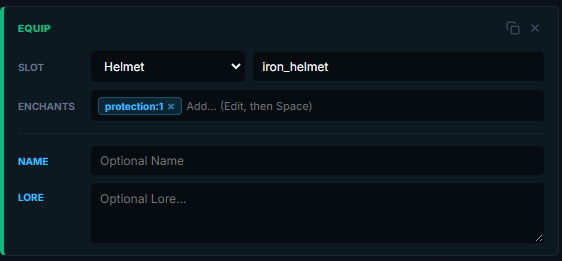
- Equip Armor: Forces an item directly into a player's equipment slot (Helmet, Chestplate, Leggings, Boots, or Offhand). If the slot is already occupied, the action fails gracefully and the player gets a notification.
- Send Message: Sends a chat message to the player viewing the menu. Supports all standard Minecraft color codes including
&athrough&f, modifiers&l(bold),&m(strikethrough),&n(underline),&o(italic), and full hex via&#RRGGBB.
- Play Sound: Plays a client-side sound for the player. You can select any native Bukkit Sound enum (like
ENTITY_PLAYER_LEVELUP) from the autocomplete dropdown.
- Open Menu: Closes the current GUI and instantly opens another menu from your workspace. Select the target Menu ID from the dropdown.

Pass arguments: You can append args to send to the new menu, e.g.profile_menu %player%opens theprofile_menuwith the current player as%arg1%.
- Close GUI: Forcefully closes the inventory screen for the player. No arguments needed.
